


Rapchat: Music Maker Studio
4.78.52K Reviews
App Specs
- Version
- 8.11.0
- Updated On
- License
- Free
- Downloads
- 5,000,000+
- Developer
- Rapchat, Inc
- Categories
- Music & Audio
- Platform
- Android, iOS
Screenshots
 Analysis by AppCompare
I tend to reach for Rapchat: Music Maker Studio when I have a line in my head and want to hear it against a beat before the idea fades. It makes phone-based rap recording feel approachable: choose a backing track, work through a take, and shape the vocal with effects. That quick creative loop is the app’s real appeal, though it works best when I treat it as a sketching and sharing space rather than a full replacement for a dedicated recording setup.
Where a connection becomes part of the process
Rapchat has a social side alongside its music tools. Browsing other creators, sharing a finished track, and taking part in community activity naturally depend on being able to reach the app’s online spaces. I find that distinction useful: making a draft is a different task from showing it to people, and the second part is where connectivity matters most to the experience.
If I’m about to record somewhere with uncertain reception, I plan the session around what I can do in the moment and leave browsing or sharing for later. That keeps a weak signal from turning a simple creative break into a frustrating one. I also avoid assuming that every screen or resource will behave the same way when the connection changes; for a smoother session, I start with a stable connection whenever I expect to explore or post.
A phone-friendly tool, with practical limits
The format suits short bursts of creativity: I can try a verse during a quiet break, save the thought in lyrics, or test a delivery without setting up microphones and recording software. That makes it easier to experiment with rhythm and phrasing than opening a more complex desktop production program. It is especially appealing to beginners who want to learn how a vocal sits over a beat before worrying about a larger studio workflow.
There is a trade-off, though. A phone is convenient, but it also puts the recording close to everyday noise, interruptions, and the limits of a small built-in microphone. I get better results by choosing a quiet spot, keeping the phone steady, and listening back with headphones if available. Effects can help shape a take, but they cannot make a distracting room or an unclear performance disappear.
Recovering when a session goes off track
Recording multiple takes gives me room to try a line again rather than treating the first pass as final. I use that flexibility deliberately: one take can focus on timing, another on energy, and then I can decide which delivery feels more natural. Breaking a verse into manageable pieces is less intimidating than trying to perform the whole thing perfectly in one go.
For any mobile recording app, interruptions are worth planning around. Before I begin, I make sure I have enough time to finish the thought and review it, rather than starting a take while I’m rushing between tasks. If the app or connection slows down, I pause instead of repeatedly tapping controls; once things are responsive again, I check the work before moving on. That small habit helps prevent a technical hiccup from becoming a creative one.
Worth Reading Before You Choose

Flipboard Shows What News Apps Must Do Beyond the Feed

Switching to Android Auto Means Rethinking Your Driving Routine

Google Calendar Makes a Crowded Week Easier to Manage

Ludo King Makes the Most of the Minutes Between Plans

Baby Panda World Brings Quick Play to Modern Phones, but Its Game Library Feels Busy

ESPN’s Live Game View Makes Following Close Games Easier
Making a session lighter on data and attention
When I want to keep mobile data use sensible, I separate creating from browsing. I can come to a session with a lyric idea ready, spend my attention on the recording, and save exploring community posts or sharing for a time when I’m on a dependable connection. It is a simple routine, but it also helps me avoid losing focus by scrolling when I meant to work on a verse.
Rapchat is free to start, and its Music & Audio category focus is clear in the way it centers beats, lyrics, and vocal recording. Rapchat, Inc. develops it; the app has a 4.6 average from around 90,000 ratings and has passed 5 million installs. It is rated Teen, and in-app purchases range from $3.89 to $49.99 per item. Those purchases are worth keeping in mind if you prefer to avoid paid extras, even though there is no need to treat a first experiment as a commitment to spend.
Getting Started with Rapchat
First things first, downloading Rapchat: Music Maker Studio is a breeze, whether you’re on Android or iOS. Once you’ve got it on your device, the setup is super intuitive. The app welcomes you with a clean interface, making it easy to dive right into the action.
Creating an account is straightforward, and you can even link your social media to share your masterpieces with friends. The home screen is where the magic happens, with options to create new tracks or explore what others are cooking up. It’s like a social network for music creators, and I love how it fosters a sense of community and collaboration.
Features That Hit the Right Notes
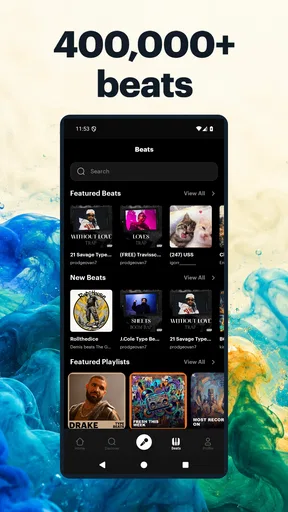
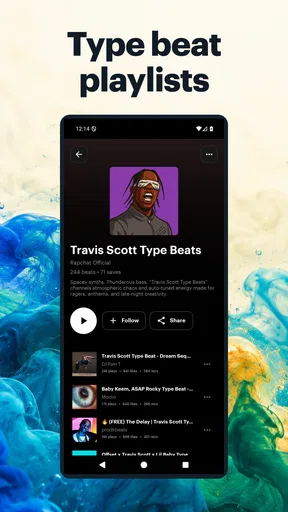
What truly sets Rapchat apart is its robust set of features. The app offers an impressive library of beats across various genres, from hip hop to trap, and everything in between. If you’re feeling experimental, you can even mix and match to create something uniquely yours.
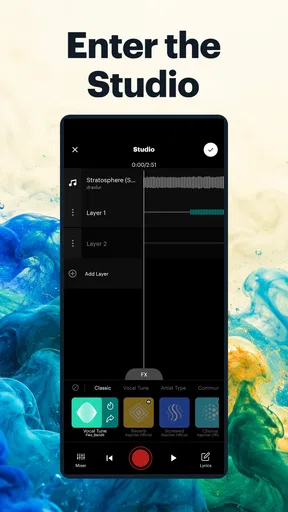
The recording feature is seamless. You can record your rap in multiple takes, which is perfect for getting that perfect flow. Plus, the app allows you to add autotune and other effects, giving your tracks a professional touch. It’s like having a mini recording studio in your pocket!
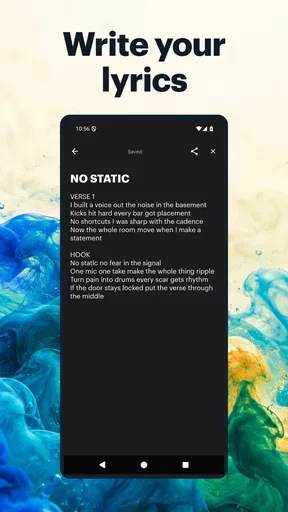
Another gem is the lyric editor. It’s simple yet effective, allowing you to jot down your rhymes as they come to you. No more scrambling for a pen and paper when inspiration strikes. And if you’re ever stuck, the app’s community offers plenty of inspiration with their own creative outputs.
Engaging with the Community
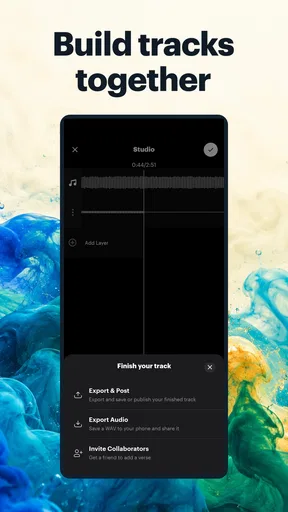
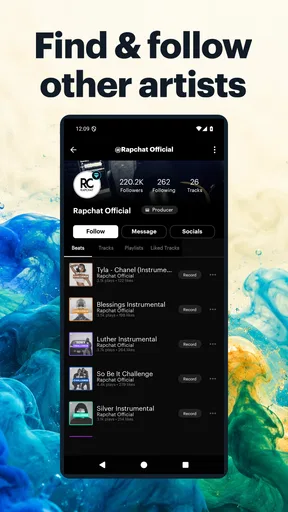
One of my favorite aspects of Rapchat is its vibrant community. The app encourages you to share your creations, and I’ve found it incredibly rewarding to get feedback from other users. You can like, comment, and even collaborate with fellow artists, which is a fantastic way to hone your skills and make connections in the music world.
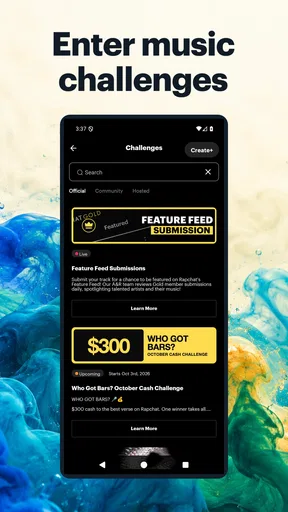
The app also hosts challenges and contests, providing an extra layer of motivation to keep creating. Winning a contest not only boosts your confidence but can also get your music in front of a larger audience. Who knows, you might just blow up!
Choosing Rapchat over a traditional music app
Rapchat is most convincing when I compare it with two familiar alternatives: a basic voice recorder and a full digital audio workstation. A recorder is quicker for capturing an idea, but it does not give me the same beat-led setting for testing cadence. A desktop production tool offers more control for arranging and polishing a complete song, yet it asks for more time and setup. Rapchat sits between those choices, making it handy for a fast rap demo and less suited to detailed production work.
That middle ground also helps answer who should skip it. If your main goal is to record clean vocals for release, build layered instrumentals from scratch, or make precise edits, I would look at a more specialized recording or production tool. If you are a beginner, a lyric writer, or someone who wants to try different flows over beats without learning a complicated studio interface first, this is a more welcoming place to start.
A small workflow that makes the app more useful
I get more out of a session when I decide what I’m testing before I press record. I might focus on whether a line fits the beat, whether the rhyme lands clearly, or whether a different vocal effect suits the mood. Keeping each attempt aimed at one question makes it easier to compare takes and less likely that I’ll keep recording without learning anything from the playback.
I also treat the lyric editor as a planning aid, not just a place to store finished verses. A rough note about where to breathe or which word should land on the beat can make a later take feel more controlled. For a quick phone session, that little bit of preparation often matters more than adding another effect. If a draft is worth developing, I can then decide whether it belongs in a more detailed production workflow.
Who will enjoy it, and what to expect
The app is an easy recommendation for someone who wants to try rapping without buying equipment or learning several production tools at once. It also suits people who enjoy getting feedback and motivation from other creators. The social layer can make sharing a rough idea feel less like sending a file into the void, although feedback is still subjective, and I would not use likes or comments as a substitute for deciding whether a track meets my own goals.
For a casual user, the main question is whether the free starting point is enough. I would explore the basic creative routine first—choose a beat, write a few lines, record, and listen back—before considering any purchase. The listed in-app purchase range is broad, so it is sensible to check the price shown for an item in the app and decide whether it solves a need you actually have. I would not pay simply because an extra is visible.
On Android, the current version is 8.7.3 and the minimum operating system is 8.0. The app first appeared on August 25, 2016, so it has had a long life as a mobile music-making option. Those details help set expectations, but the practical test is still whether its recording flow feels comfortable on your own device and whether the beat-led approach matches the kind of music you want to make.
Why You’ll Love It
Let’s be real, Rapchat: Music Maker Studio is not just about making music; it’s about expressing yourself and connecting with others who share your passion. Whether you’re a seasoned rapper or someone just starting out, there’s something here for you. The app is continually updated, adding new beats and features to keep things fresh and exciting.
It’s also incredibly user-friendly. I’ve tried other music-making apps before, but they often felt overwhelming. Rapchat strikes the perfect balance between functionality and simplicity, making it accessible to everyone.
And let’s not forget, it’s free to use! There are in-app purchases for those who want to unlock premium features, but the basic version is more than enough to get your creative juices flowing.
Wrapping It Up
In conclusion, if you’re looking to dive into the world of music creation, Rapchat: Music Maker Studio is an excellent place to start. It’s packed with features, fosters creativity and community, and is just plain fun to use. So, what are you waiting for? Download it, start creating, and who knows, maybe I’ll be listening to your tracks soon!
My connectivity verdict
Connectivity shapes Rapchat most when I move from private practice to discovery and sharing. I’d use a reliable connection for exploring the community and handling anything I want to post, while keeping a simple recording session focused on the creative task at hand. That approach is practical for commuters, students, or anyone fitting music into spare moments, without assuming every part of the app will behave identically under changing network conditions.
Overall, I see it as a friendly mobile starting point for turning a lyric into a beat-backed vocal idea and, if I choose, sharing that work with other creators. It is not the best choice for someone seeking a full studio on a phone or a polished, distraction-free recording environment. But if the goal is to experiment, build confidence, and make a rough track while inspiration is fresh, Rapchat offers a useful balance of accessibility and creative momentum.
Pros
- Easy-to-use interface for beginners.
- Wide variety of beats available.
- Collaborate with other artists easily.
- Built-in recording and mixing tools.
- Social sharing features for tracks.
Cons
- Limited features in the free version.
- Occasional app crashes reported.
- Requires in-app purchases for extras.
- Some users find ads intrusive.
- Editing tools could be more advanced.
FAQs for Rapchat: Music Maker Studio
What features does Rapchat: Music Maker Studio offer to users?
Rapchat provides a platform where users can create their own rap music using a wide array of beats and tools. It features a built-in notepad for lyrics, a library of over 100,000 beats, and collaboration options. Users can also share their creations on social media or within the app’s community, making it ideal for both beginners and experienced artists.
Is Rapchat: Music Maker Studio free to use, or are there in-app purchases?
Rapchat is free to download and use, but it offers in-app purchases for users who want access to premium features. These can include additional beats, advanced editing tools, and enhanced sharing capabilities. The app provides enough free content for casual users, but serious creators may find the premium options worthwhile.
Can I collaborate with other artists on Rapchat?
Yes, Rapchat allows users to collaborate with other artists seamlessly. You can invite friends or connect with new artists within the app to work on tracks together. This collaboration feature is a highlight for many users looking to expand their creative network and enhance their musical projects.
How user-friendly is Rapchat for beginners in music production?
Rapchat is designed with an intuitive interface, making it very accessible for beginners. The app provides step-by-step guides and tutorials to help new users get started with creating music. Its user-friendly layout ensures that even those with no prior experience in music production can start making tracks quickly.
What are the system requirements for installing Rapchat on Android and iOS devices?
To install Rapchat, Android users need a device running Android 5.0 or later. For iOS users, an iPhone or iPad with iOS 11.0 or later is required. The app is optimized for both platforms, ensuring a smooth experience across a range of devices. Regular updates help maintain compatibility with newer models and OS versions.


